Enhancing Research Oversight & Reducing Operational Friction Across a Critical Platform
“The new dashboard makes it obvious which projects need follow-up. I can triage alerts, delegate tasks, and feel confident I’m not missing anything important.”
– Responsible Staff Officer
NAPAR is a mission-critical repository for projects, events, and committee activity at the National Academies. The legacy experience made it hard for staff to see what needed action first, route work correctly, or create records safely. I redesigned NAPAR into a role-based, alert-driven experience that reduces noise and clarifies execution: urgent items surface as a single, action-ready list (with due dates and consequences), while supporting cards provide lightweight context and upcoming-event prep without overwhelming day-to-day operators.
Project Snapshot
- My Role: Lead UX Designer — experience strategy, interaction design, research leadership, and design-system integration
- Team: 3 developers, 2 program officers, 1 UX researcher, IT, and cross-functional admins
- Timeline: 5 months (Discovery → Launch) with ongoing iteration
- Scope: Role-based dashboards, alert-routing model, guided project creation, project explorer, and updated project view
Leadership
- Defined the UX vision for role-based dashboards and alert routing
- Mentored developers on token usage, responsive grids, and accessibility
- Coached staff on task-based testing and survey design
- Facilitated cross-functional reviews to align IA, filters, and workflows to real project lifecycles
Context
The National Academies Projects & Activities Repository (NAPAR) stores projects, events, and committee membership across divisions. It serves everyone from junior staff entering data to federal sponsors reviewing progress and risk.
Problem
The legacy site was list-driven and form-heavy. Staff had to sift through long pages to understand status, risk, or even whether a project already existed in the Governing Board–approved repository (TurboGBEC). Duplicate projects, mislinked events, and frequent support tickets followed.
Solution
I redesigned NAPAR as an alert-first, role-based system with a clear prioritization model. Instead of scattering the same work across multiple widgets, urgent items are consolidated into a single “Needs Attention Today” list with due dates, consequences, and routed next steps. A Project Explorer consolidates search and filters, and a guided Add/Edit Project modal adds guardrails so junior staff can safely import or create projects without introducing duplication or data integrity risk.
Research & Strategy
Benchmarking the Current Experience
I ran a baseline usability survey and listening sessions to quantify pain around project creation, event association, and search. We focused on core tasks that directly affected risk and support load.
- Adding/editing projects and events
- Locating projects given partial information
- Understanding whether a project already existed in TurboGBEC
Findings pointed clearly to three opportunities: a guided creation flow, a role-aware dashboard, and a more powerful Project Explorer.
42%
Staff unaware of TurboGBEC duplicates
65%
Difficulty linking events to projects
70%
Wanted improved search & filtering
These numbers helped secure buy-in for structural changes, not just “nicer forms.”
Designing for a Multi-Role Ecosystem
NAPAR supports three primary groups: responsible staff officers, program assistants, and federal sponsors. I created personas to clarify their needs, risk tolerance, and mental models, and used them to drive dashboard and alert decisions.
User Personas: Designing for a Multi-Role Ecosystem
To ensure the platform supported both strategic decision makers and day-to-day operators, I led persona work to clarify needs across three core roles.

Occupation: Responsible Staff Officer | Age: 43
Oversees multiple academic projects and working groups; coordinates committee activities and staff. Expected to maintain accurate records and respond quickly to risks or delays.
- Monitor committee activities and project health at a glance
- View and manage committee members, events, and milestones
- Delegate routine updates while retaining oversight and accountability
- Project pages do not clearly surface status or recent activity
- Managing meetings, events, and member bios is fragmented
- Delegation is risky when the system is not intuitive for new staff
- Scans committee activities daily as part of risk monitoring
- Follows up with Program Assistants for accuracy and completeness
- Prefers summarized dashboards with drill-down only when needed
Advanced – deeply familiar with rubrics, phases, and compliance expectations.
- Primarily desktop during work hours
- Mobile when traveling or attending events
“I need a clear status overview so I can make strategic decisions quickly.”
Opens the dashboard each morning to prioritize follow-ups for at-risk projects before committee meetings.

Occupation: Program Assistant | Age: 26
Executes day-to-day project and event updates, uploads materials, and assists with coordination. Highly detail-oriented but still internalizing policy and data rules.
- Quickly add new projects or safely import existing ones
- Add events with confidence that they are linked to the correct project
- Follow step-by-step flows that prevent mistakes
- Unclear whether a project already exists in TurboGBEC
- Not intuitive to link events to the correct project, especially with similar titles
- Hard to track versioned documents and know what is current
- Checks in with Olivia for guidance when the system is ambiguous
- Primarily desktop; prefers structured, guided flows over freeform forms
Beginner – understands core tasks but relies on system cues and checklists.
- Desktop during office hours
- Occasional tablet or mobile for remote uploads
“Just tell me what to upload and where it goes—I will take care of the rest.”

Occupation: Federal Sponsor | Age: 48
Oversees compliance and ensures partner institutions meet funding expectations. Needs to understand project status without getting lost in implementation details.
- Confirm milestones and deadlines are being met
- Ensure compliance with funding terms and reporting expectations
- Access summary views that clearly show risk and progress
- Too many documents and pages to scan for a single view of status
- Slow to identify when interventions are needed
- Unclear how in-progress work is reflected in the system
- Logs in occasionally to prepare for reviews or briefings
- Looks for obvious red/yellow flags to identify issues
- Relies on high-level dashboards rather than edit screens
Why the Old Experience Struggled
The previous “Current Projects” view presented long, text-heavy pages with little visual hierarchy. Projects were discoverable only through narrow lists: by title, by PIN, or by single staff attributes, with no way to combine filters.
Project creation screens were similarly dense, requiring deep institutional knowledge and frequent back-and-forth with IT when mistakes were made.
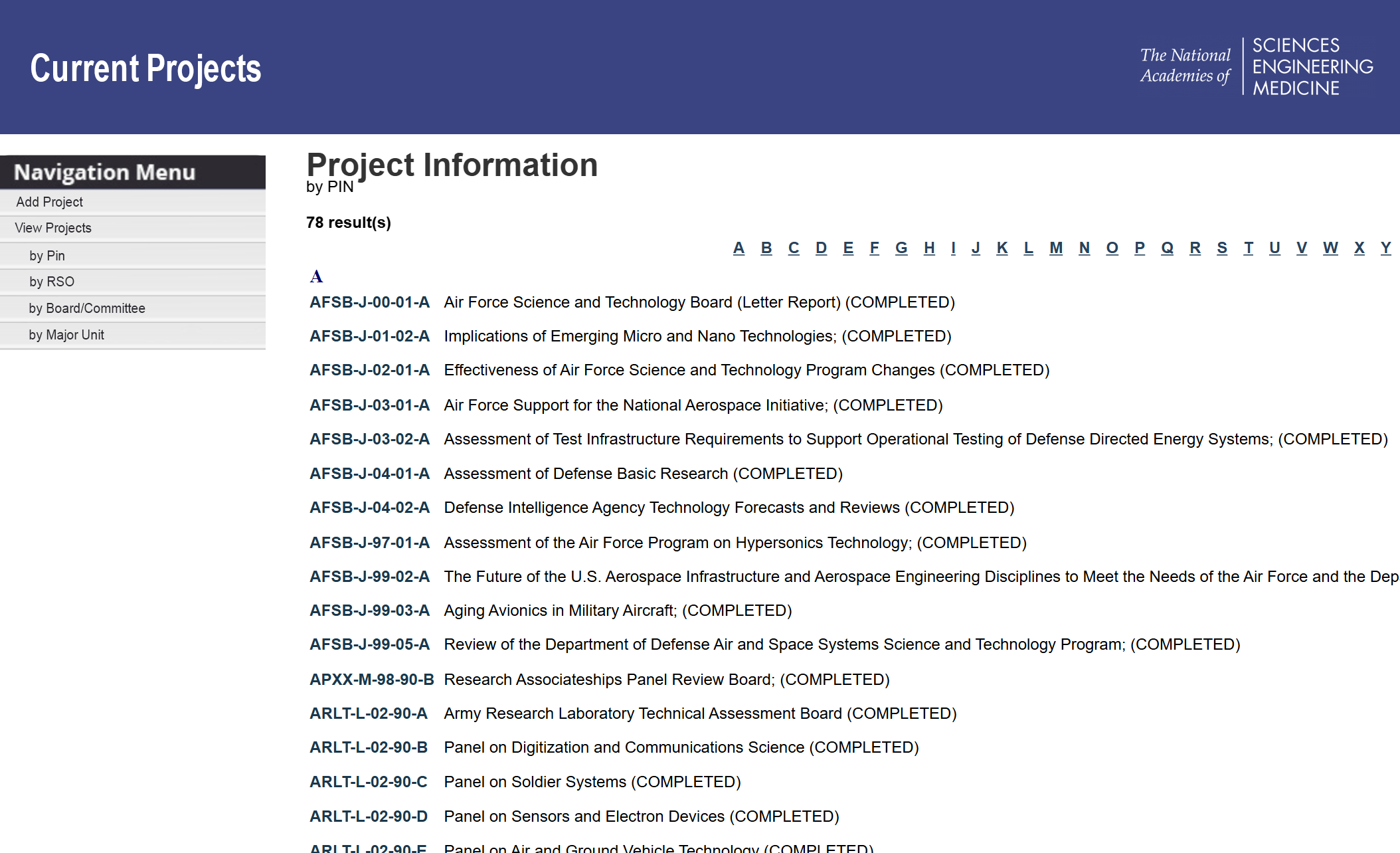
Legacy project view — dense, scroll-heavy, and optimized around forms rather than decision support.
Designing for Action: Role-Based Dashboards & Alert Prioritization
Instead of a one-size-fits-all homepage, I created dashboards tailored to each persona. The guiding principle was reducing cognitive load while increasing accountability: surface what needs action first, then provide drill-down for context. The visual language stays calm and med-tech appropriate — neutral by default, with sparing use of alert color reserved for true urgency (e.g., today/overdue).
- Prioritize urgent work in one place to prevent “alert scatter”
- Make each alert immediately actionable (clear next step + due date)
- Support delegation and triage without requiring users to open multiple pages
Program Officer / RSO dashboard — portfolio visibility and routed actions support risk monitoring and delegation across multiple projects.
Program Assistants see a variant tuned to execution. Instead of repeating the same task logic across multiple widgets, urgent work is consolidated into a single “Needs Attention Today” list with due dates and consequence-driven context, helping assistants act quickly and confidently. The rest of the dashboard stays intentionally lightweight: a small welcome card for orientation and an Upcoming Events card to support packet and materials preparation.
- Reduces overwhelm by giving tasks a single “home”
- Makes urgency scannable (Today / Tomorrow / Overdue)
- Connects action to impact (“If no action…”) to prevent missed prep work
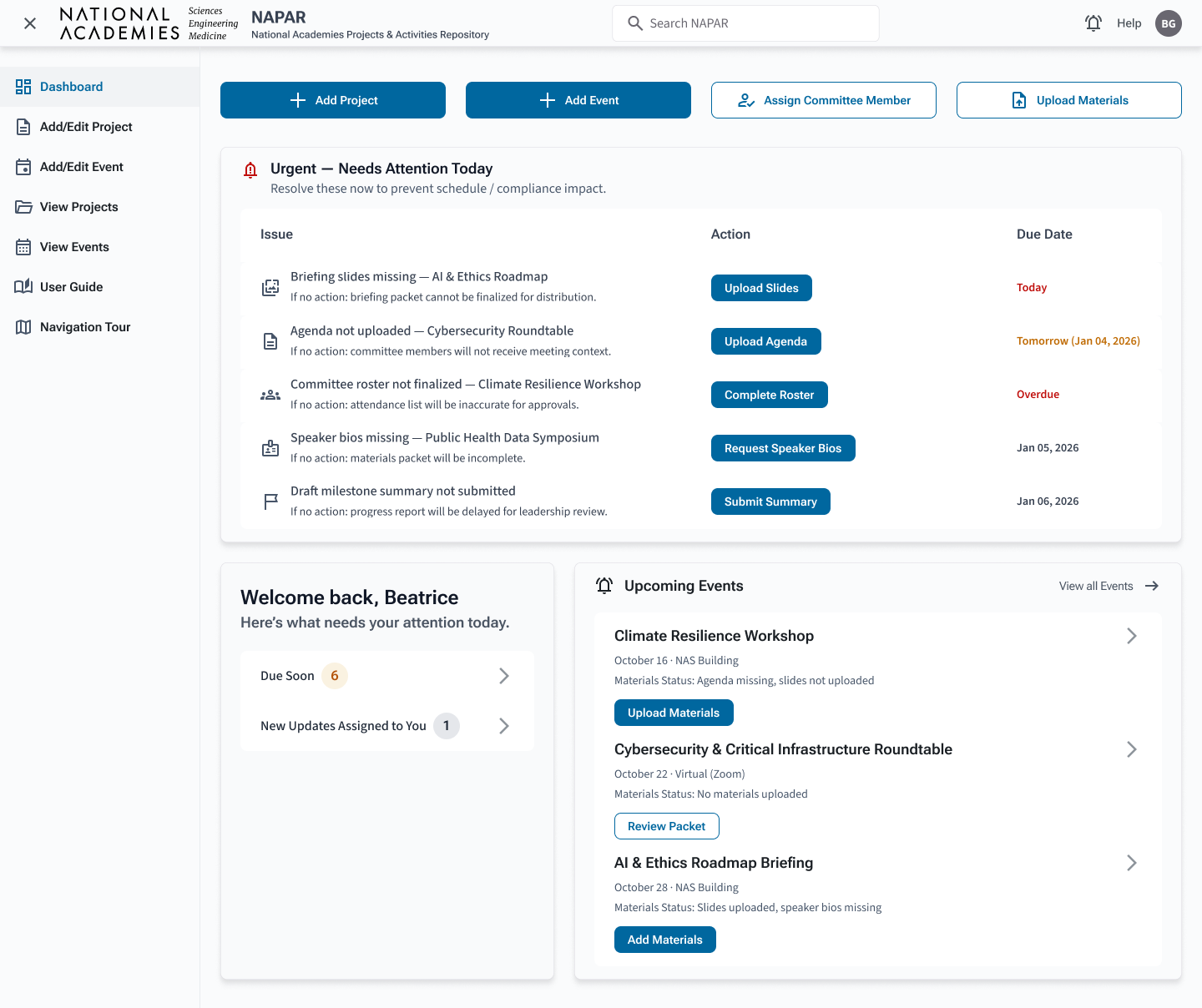
Program Assistant dashboard — urgent actions consolidated into a single, scannable list, supported by lightweight context and upcoming-event prep.
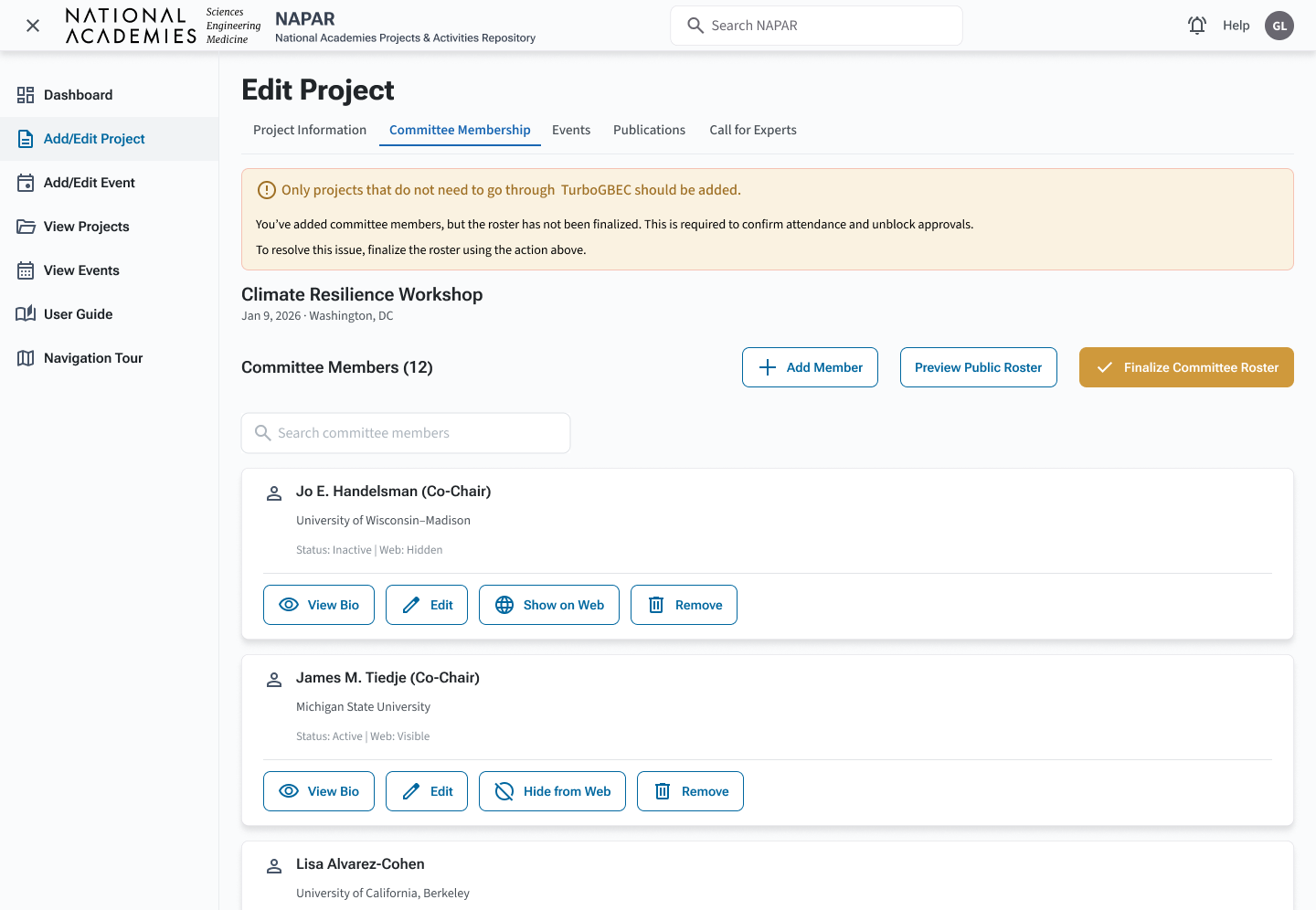
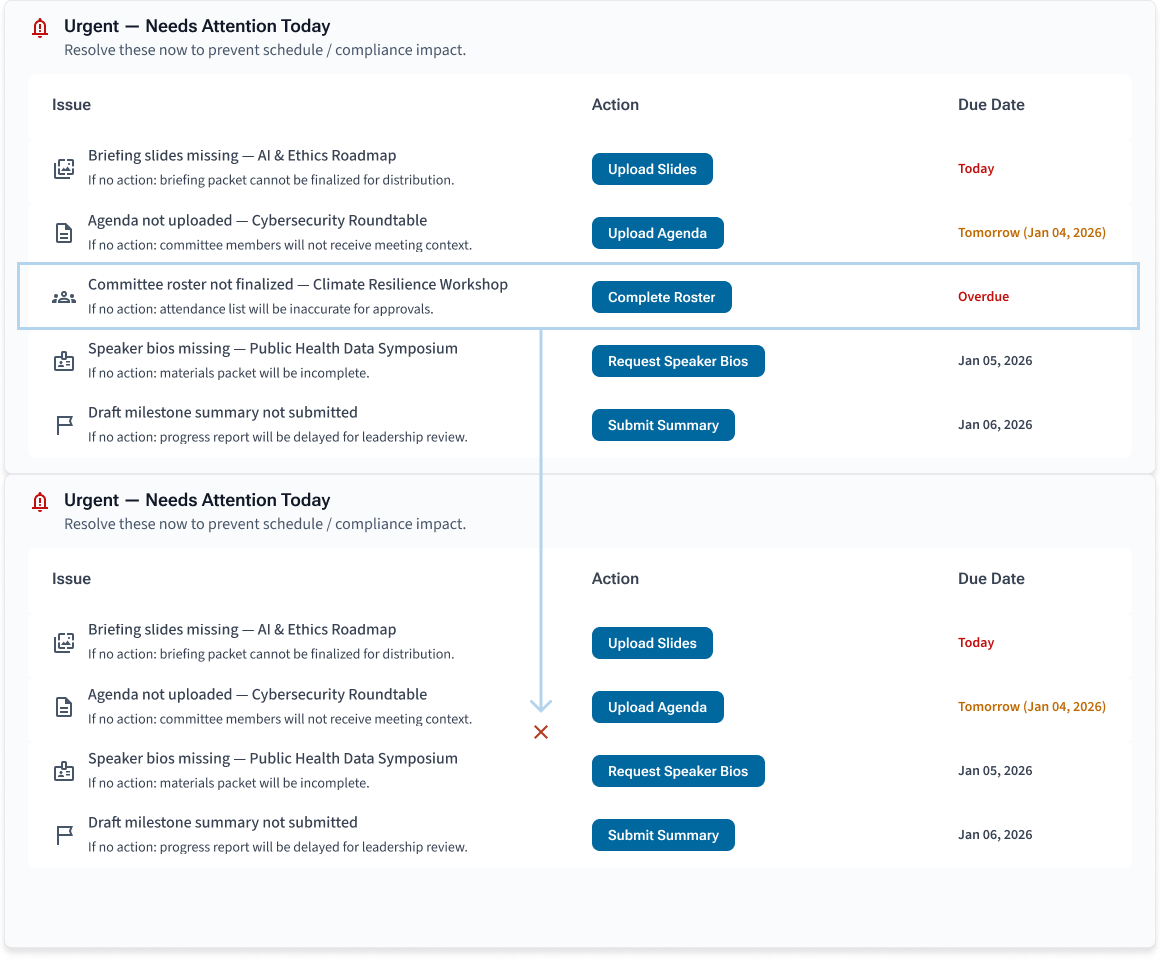
Happy Path: Resolve “Committee roster not finalized”
From Beatrice’s dashboard, the overdue roster alert routes directly to the Committee Membership tab. The experience de-escalates urgency from the dashboard into an instructional warning, confirms context, and presents a single primary action to finalize the roster.
- Routes from: Urgent alert card → Committee Membership
- Guidance: warning state + one primary resolution action
- Outcome: resolved item automatically removed from Urgent alerts
On mobile, the dashboard collapses into a focused, scrollable layout with a short primary CTA strip (Add Project, Add Event) and the urgent list above the fold. This preserves the same prioritization model across devices, reducing cognitive switching and helping staff act quickly while traveling or supporting events on-site.
Component Highlights: Designing for Consistency at Scale
To keep NAPAR calm, trustworthy, and easy to maintain across multiple roles, I standardized core UI patterns into reusable components. This ensured the experience stayed consistent from dashboards to modals—while making it easier for developers to implement and extend without visual drift.
- Faster comprehension: repeatable patterns reduce re-learning across pages
- Safer execution: clearer inputs + error states reduce data-entry risk
- Scalable delivery: shared components accelerate build and future enhancements
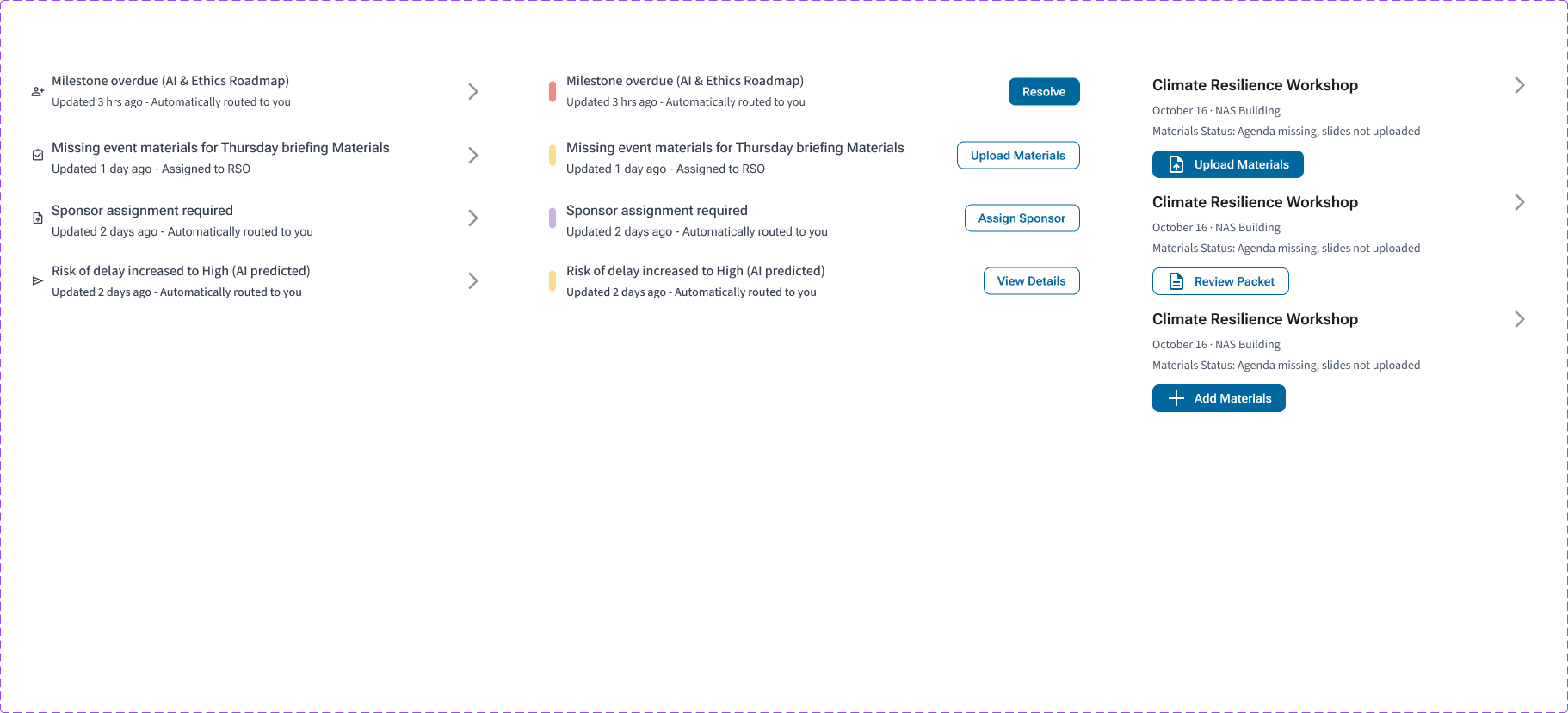
Alert Cards & Routed Actions
Alerts are designed to be scannable (severity + short description) and actionable (clear next step), so staff can triage quickly without opening multiple pages.
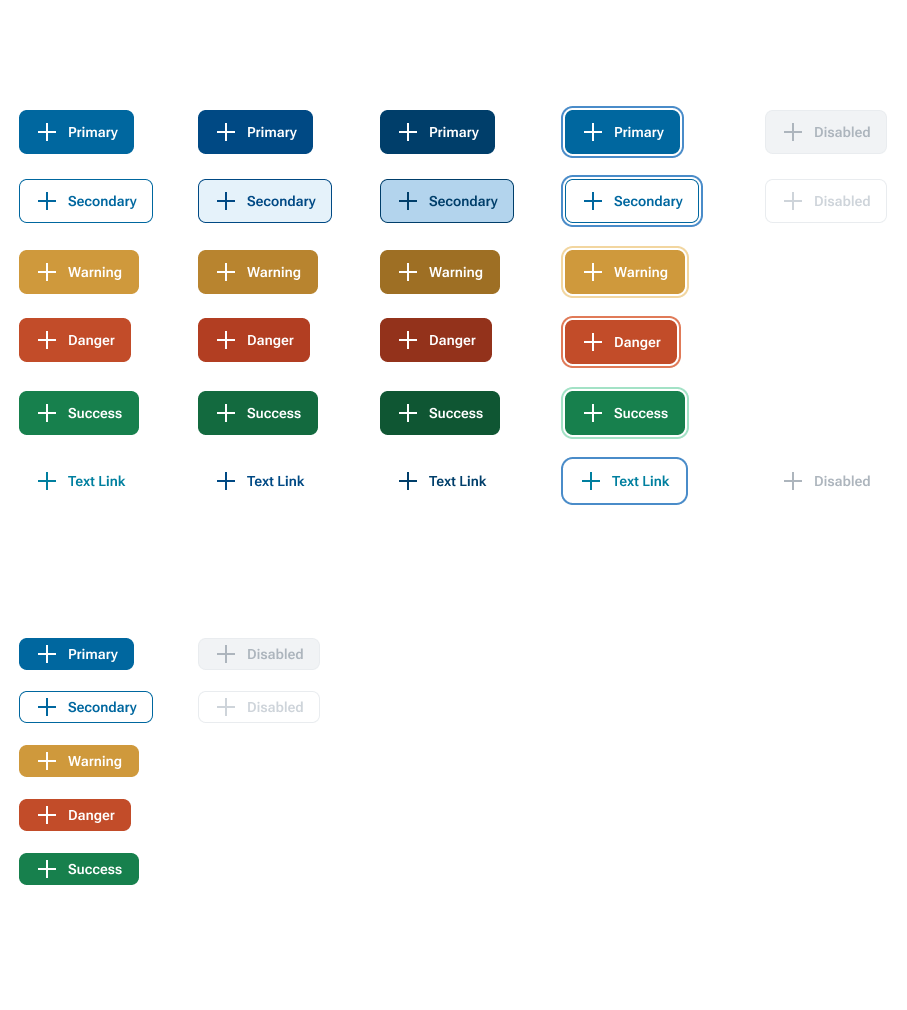
Button System: Variants & States
Primary, secondary, and status variants follow a consistent hierarchy across default/hover/active/focus, reinforcing which actions are most important while maintaining accessible focus treatment.
Form Inputs: Focus, Disabled, and Error
Input states prioritize clarity and restraint: neutral by default, strong focus visibility for keyboard navigation, and concise error messaging to reduce correction time and prevent submission failures.

These component patterns were reused across dashboards, the Project Explorer, and guided modals to reduce cognitive load and ensure consistent implementation.
Project Explorer: Consolidated Search & Filtering
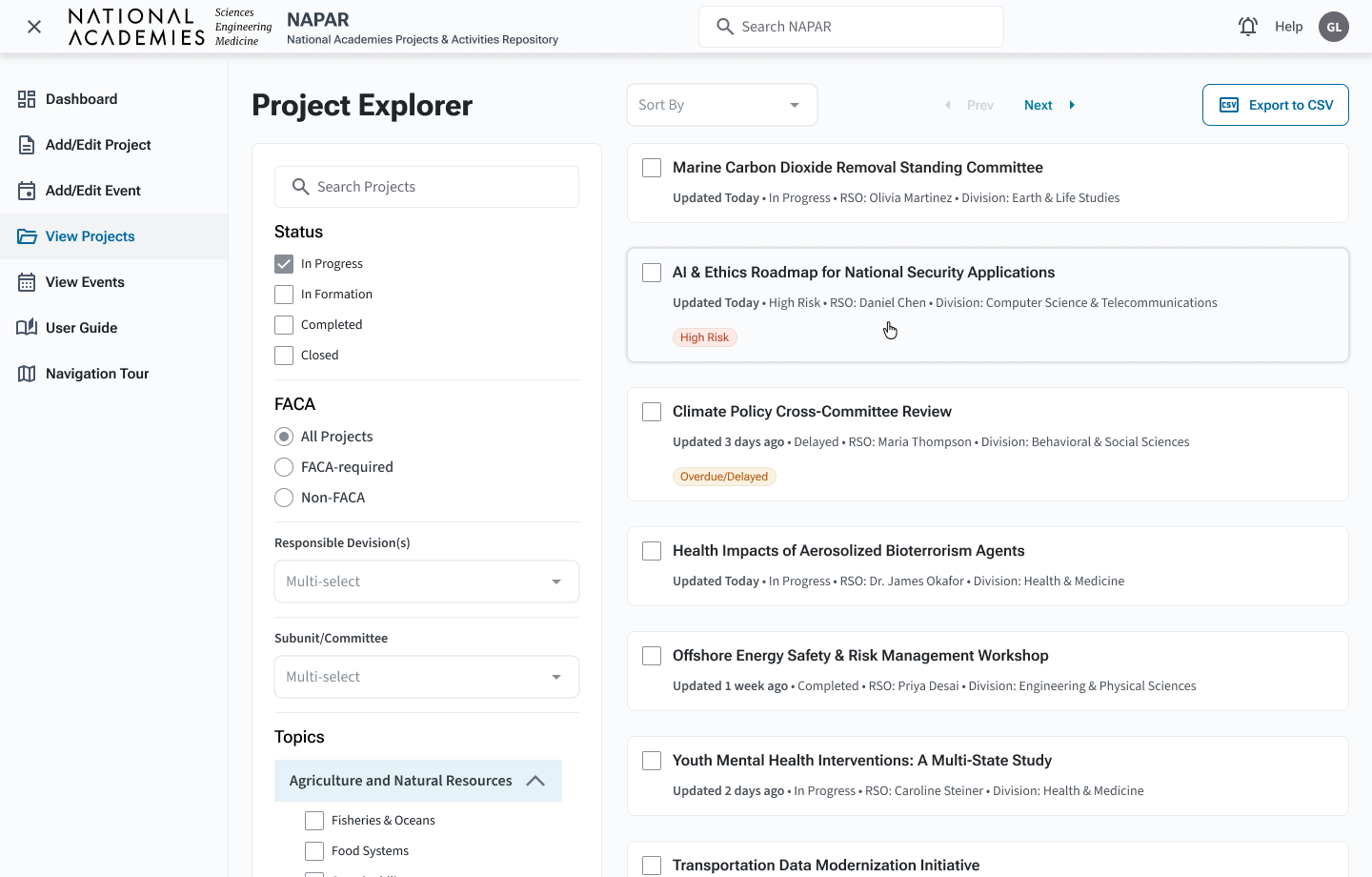
The previous system split search across multiple pages (advanced search, view by title, view by PIN, and more). I merged these into a single Project Explorer with a left-hand filter rail and scrollable result cards on the right.
- Global search in the header for known titles or IDs
- Facet filters for status, FACA, division, committee, and topics
- Inline metadata (updated date, RSO, division) for each project card
- Severity badges (e.g., “High Risk”, “Overdue/Delayed”) reserved for time-sensitive issues
Guided Add/Edit Project Modal: Guardrails for Safer Creation
Before the redesign, junior staff often weren’t sure whether a project already existed in TurboGBEC or NAPAR. That uncertainty led to duplicates, mislinked events, and downstream clean-up for IT.
I introduced a stepwise modal that asks a single, high-value question up front: “Is your project currently in TurboGBEC?” From there, the flow branches into three supported paths:
- Import from TurboGBEC – search, confirm a match, and pull in authoritative data.
- Edit an existing NAPAR project – search within NAPAR when staff know the record already exists there.
- Create a new project – only after both searches are exhausted, reducing duplication risk.
Rather than show every micro-step, the carousel highlights the key decision points that usability testing showed were most critical for confidence.
Guided Add/Edit Project flow — three supported paths, one mental model.
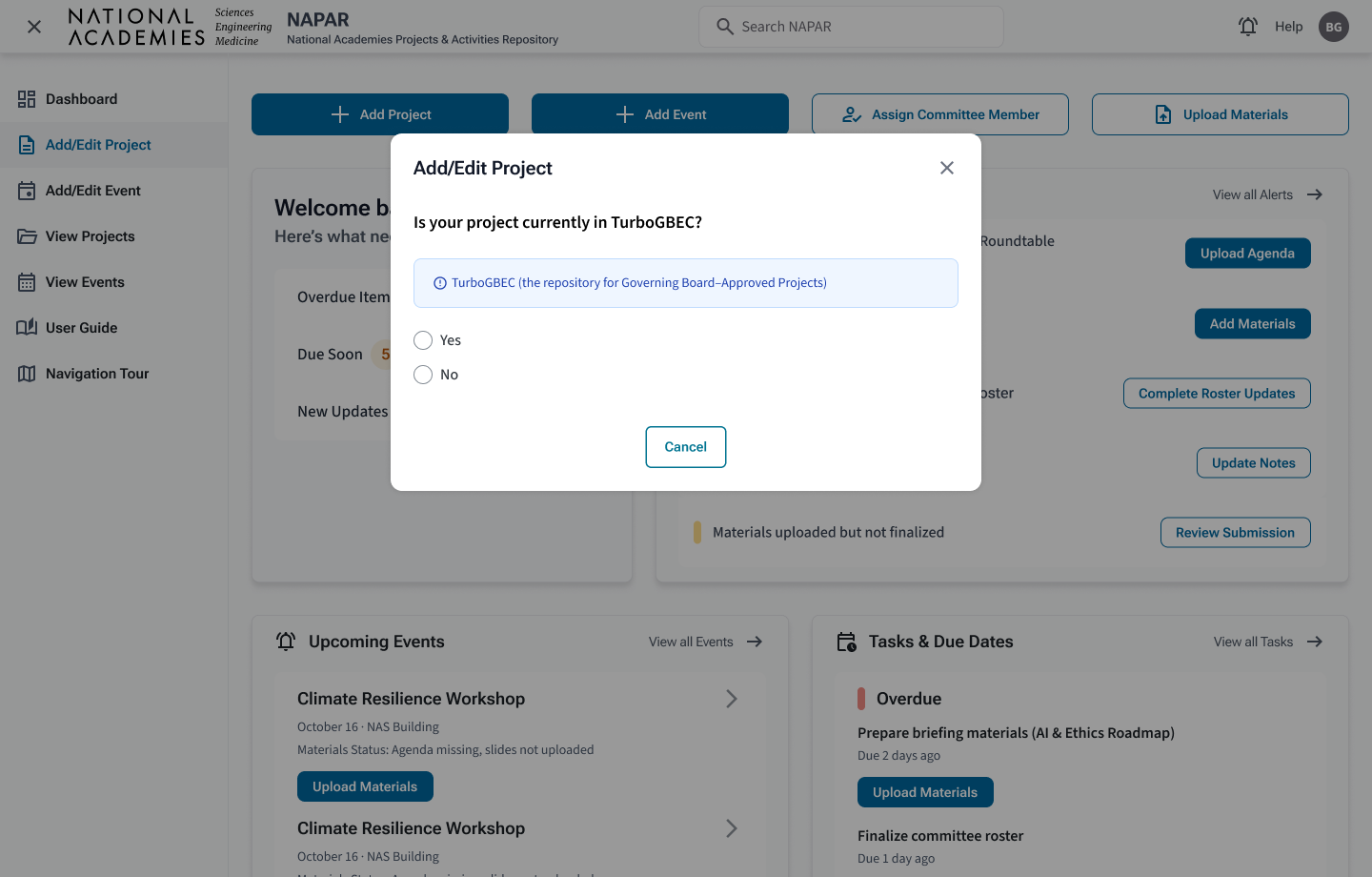
Step 1 Staff decide whether the project is in TurboGBEC, establishing a clear starting point.
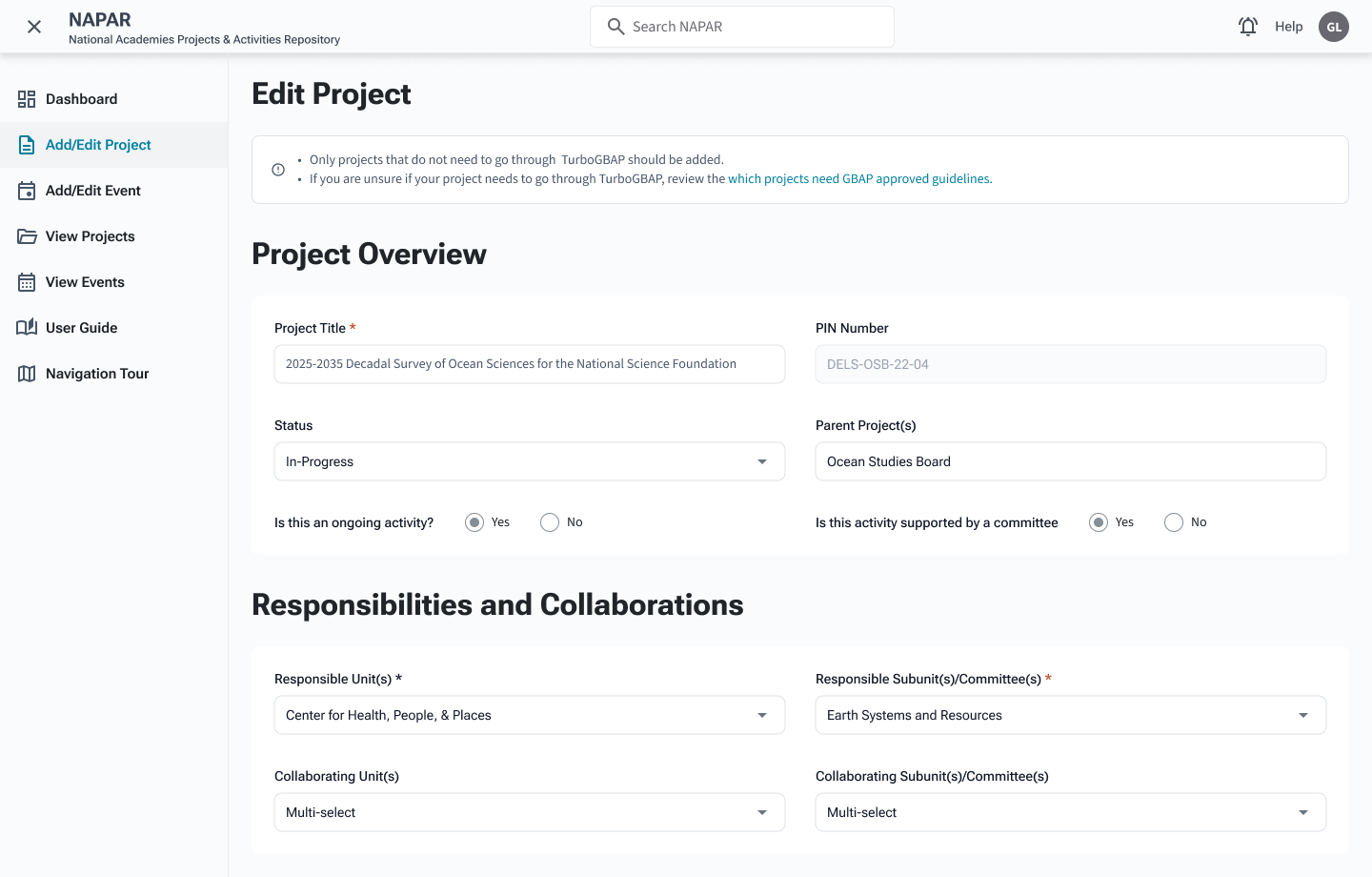
Step 2 When a match is found (in TurboGBEC or NAPAR), staff land on a focused edit screen with clear status and ownership.
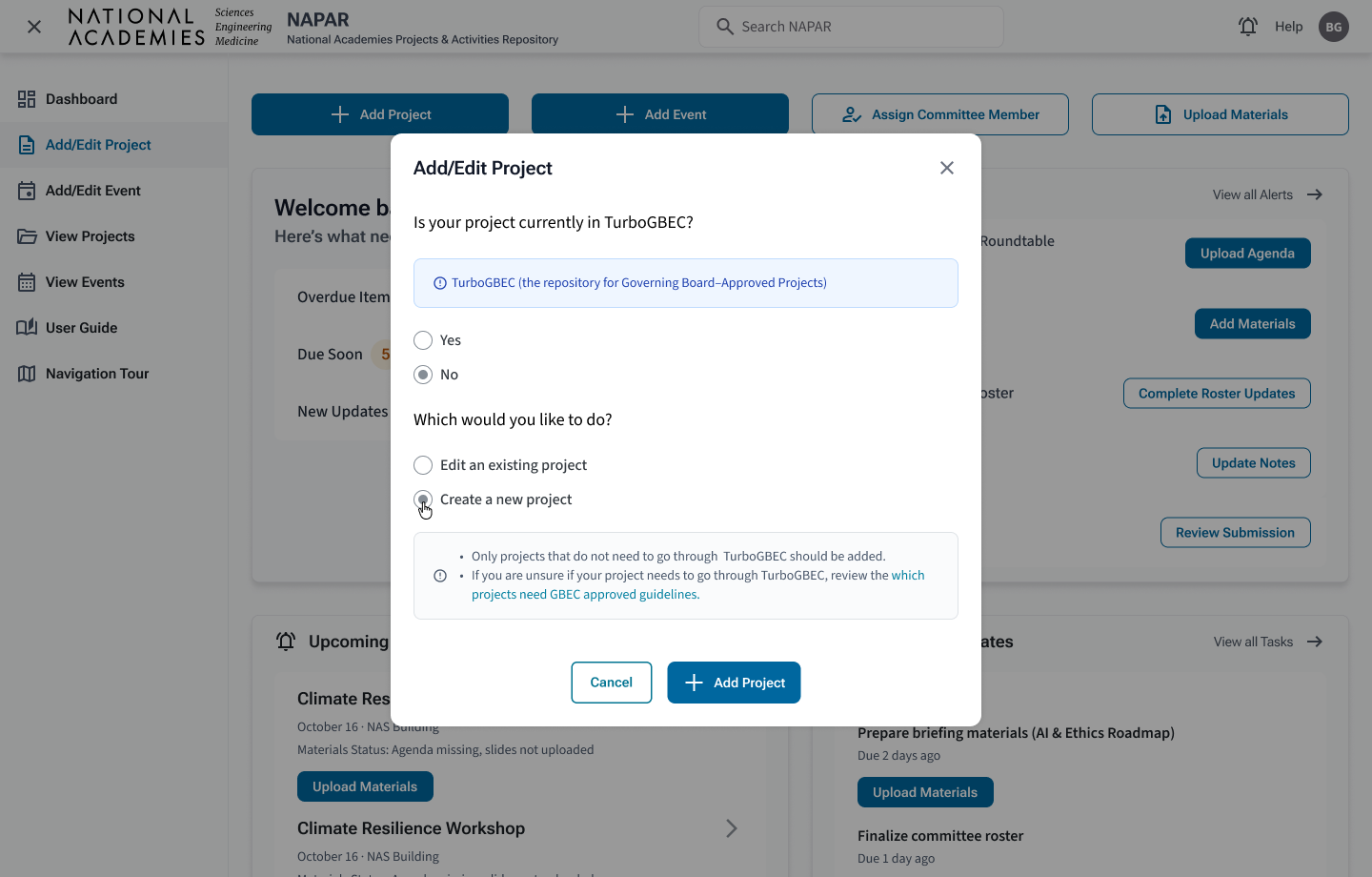
Step 3 Only after both searches are exhausted does the flow allow creation of a brand-new project, with copy that reinforces when this is appropriate.
Project View: Clear, At-a-Glance Context for Sponsors and Staff
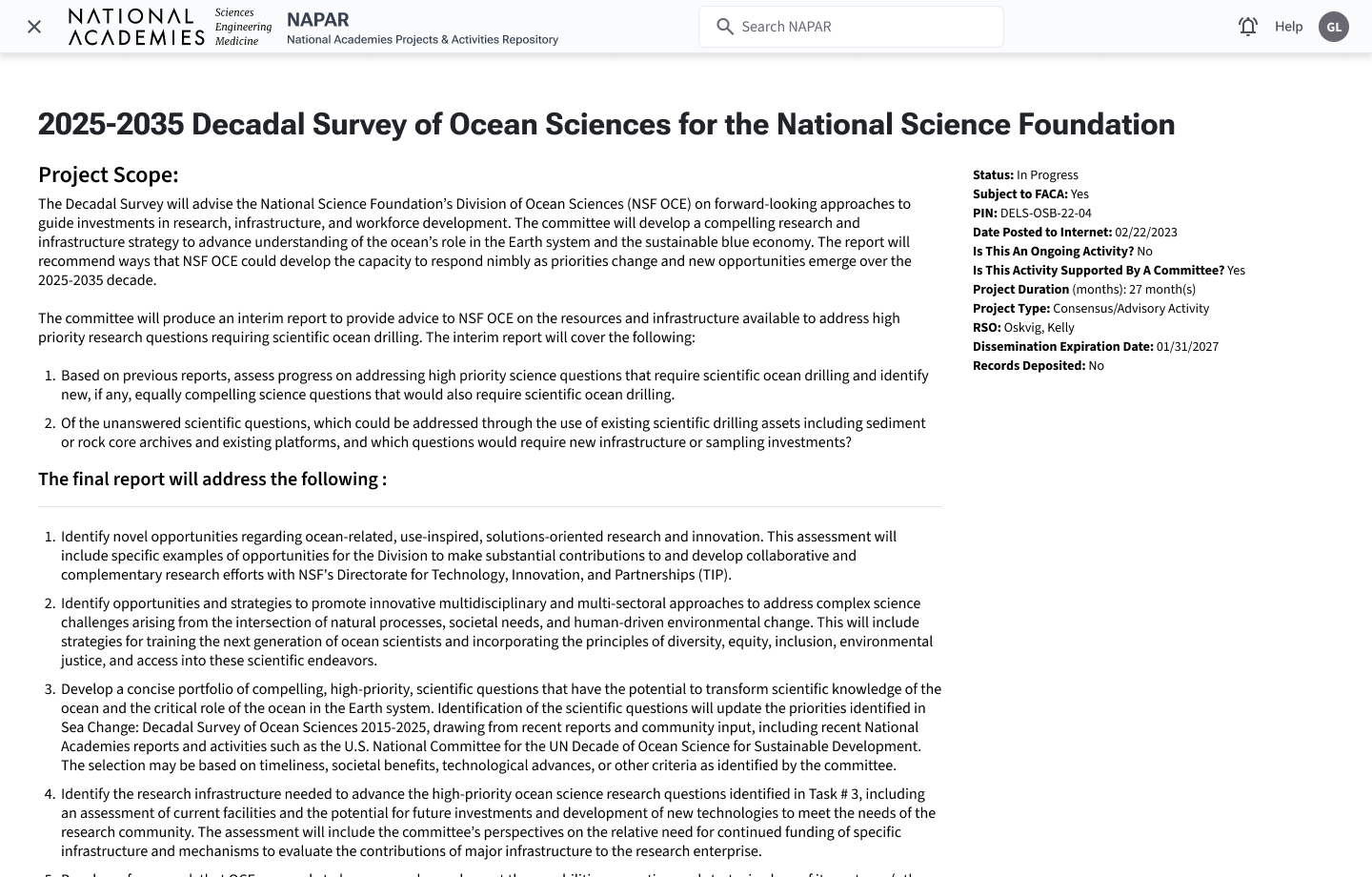
Once a project is selected, stakeholders need a concise status story: where the project sits in its lifecycle, which events and milestones are upcoming or overdue, and who is responsible.
The redesigned project view uses a modular layout — overview, responsibilities, committee membership, events — with clear headings and restrained typography so sponsors like Edward can scan before drilling into documentation.
Business Impact Summary
Staff reported a 33% improvement in workflow efficiency, driven by role-based dashboards and a clearer prioritization model: urgent actions were consolidated into a single, actionable list (due dates + next steps), reducing time spent re-triaging the same work across multiple widgets.
Severity badges, predictive insights, and routed alerts help teams identify high-risk projects and missing materials sooner, mirroring escalation patterns seen in med-tech environments.
Clearer flows around project creation and event association contributed to a 40% reduction in IT support tickets, freeing capacity for higher-value work.
Outcome & Next Phase
The NAPAR redesign transformed a form-driven repository into a role-based, alert-first system grounded in real workflows. Program Officers can monitor portfolio health at a glance, Program Assistants can execute tasks with confidence, and sponsors can access concise project summaries without digging through dense reports.
As Staff-level UX lead, I drove the experience vision, research, and implementation details — from dashboard card hierarchy and alert routing to the guardrails in the Add/Edit Project modal. The next phase will extend the same patterns to additional analytics views and sponsor-facing dashboards, keeping role-specific clarity and data integrity at the center of the work.