Designing a Multi-Role Therapy Platform
“I don’t want another generic therapy portal. I need schema-specific tools that help me stay consistent and keep patients engaged — without compromising privacy.”
– Schema Therapy Clinician
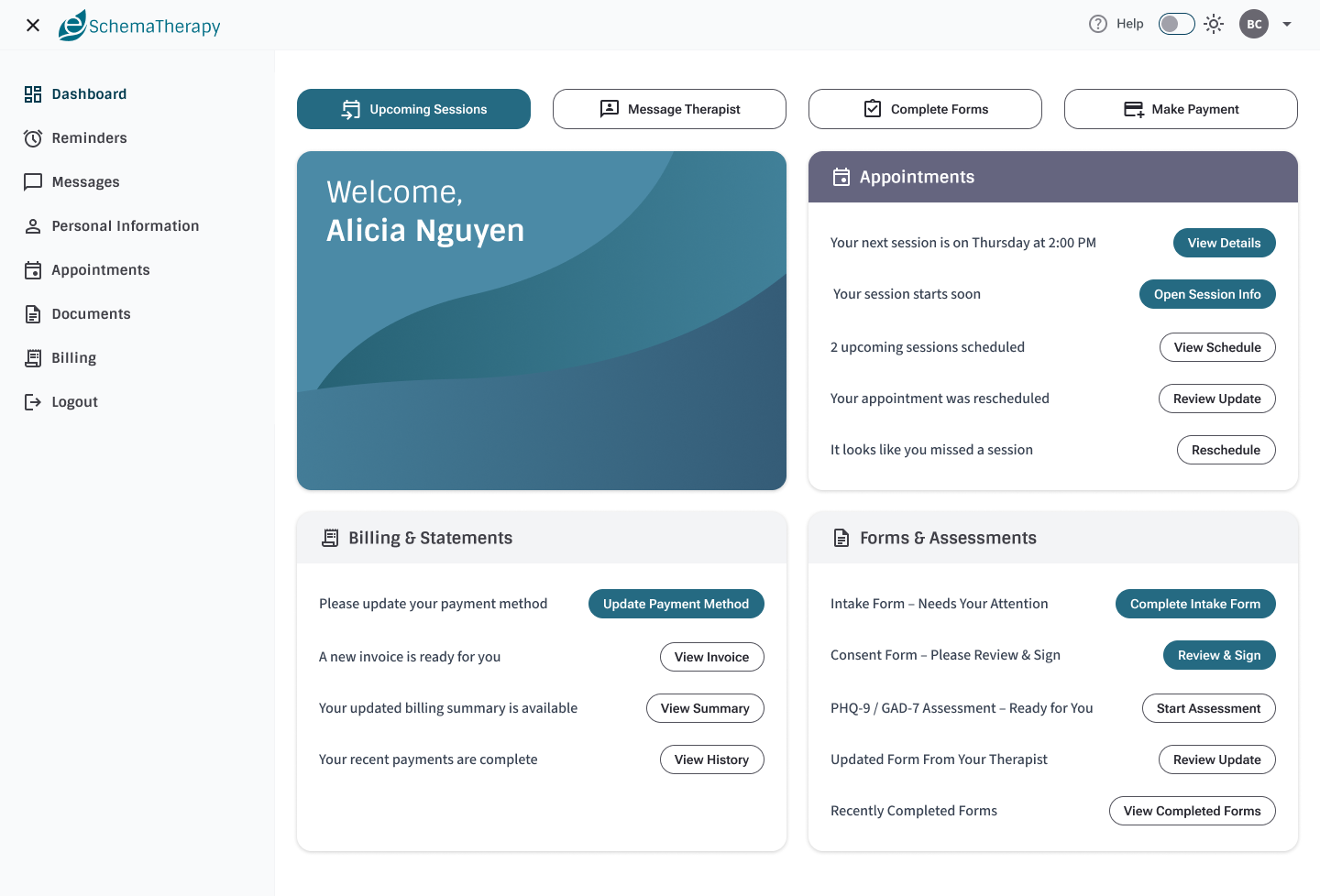
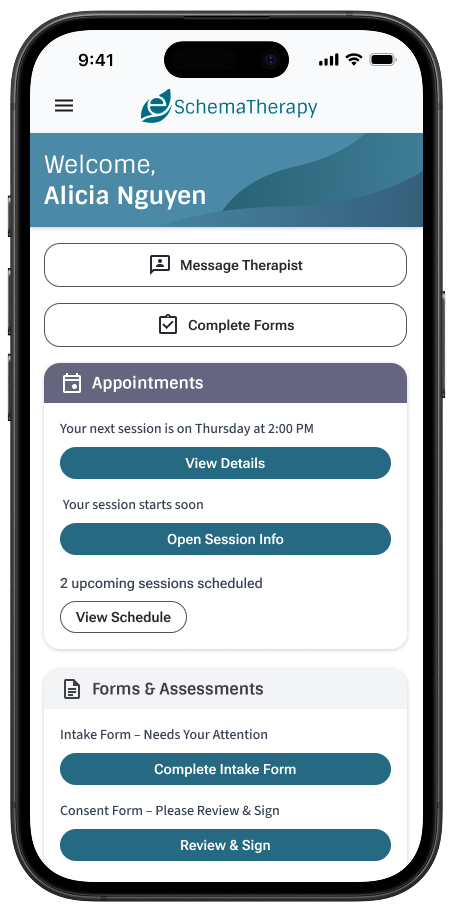
eSchemaTherapy is a role-based Schema Therapy platform designed to expand access to specialized care while giving clinicians a calm, structured workflow for scheduling, documentation, assessments, and billing — all within a secure, compliant environment. I designed the core product experience across Admin, Therapist, and Patient dashboards, and defined the design-system patterns that make the platform scalable.
Project Snapshot
- My Role: Lead UX Designer & Front-End Developer — product strategy, interaction design, prototyping, token-driven UI, and front-end implementation
- Users: Admins (oversight/compliance), Therapists (clinical operations), Patients (care participation)
- Scope: Role-based dashboards, scheduling, documents & assessments, billing, staff onboarding & approvals, and platform governance patterns
- Focus: Therapist workflows first (highest cognitive load), with patient views intentionally simplified to support trust and follow-through
Leadership
- Defined a role-based IA to control complexity and reduce cognitive overload
- Established a scalable component system (tokens, states, accessibility patterns)
- Designed a “calm UI” approach for clinical + billing exceptions (alert restraint)
- Set compliance-first UI conventions (least-privilege visibility, export controls, audit-friendly patterns)
Context
Schema Therapy is a structured, evidence-based modality that benefits from consistent measurement, clear treatment planning, and longitudinal tracking. However, access is often limited by geography and the small number of trained specialists. eSchemaTherapy focuses on making schema-specific care easier to deliver and easier to participate in — globally — through a secure, dedicated platform.
Problem
Most existing options are either broad therapy portals or fragmented tools (paper forms, spreadsheets, PDFs, ad-hoc scoring). That fragmentation creates inconsistency in interpretation, increases admin burden for therapists, and introduces privacy and compliance risk when sensitive clinical data moves across uncontrolled channels.
Solution
I designed eSchemaTherapy as a role-based platform with schema-specific workflows: clinicians get integrated assessment + documentation patterns, patients get clear “next-step” participation, and admins get oversight for security, approvals, and data governance. The UI emphasizes clarity, calmness, and continuity across scheduling → documentation → billing.
Research & Strategy
What We Needed to Learn
Early strategy focused on aligning three perspectives: patients who need simple next steps, clinicians who need schema-specific structure, and admins who need confidence in privacy and governance. The biggest constraint wasn’t “features” — it was consistency, trust, and reducing workflow friction across the entire care loop.
- What tasks create the most cognitive load for clinicians?
- What information helps patients follow through without overwhelm?
- What oversight controls are essential for compliance and operations?
The resulting strategy: role-based complexity, calm exception-driven alerts, and a design system that can scale as the platform grows.
High
Clinical admin burden (docs + scoring + follow-ups)
Low
Patient tolerance for “portal complexity”
0
Acceptable tolerance for privacy ambiguity
- Role-aware complexity: show only what each user needs
- Alert restraint: notify on required action, not passive info
- Continuity: connect scheduling → documentation → billing
- Governance: enforce least-privilege visibility and export controls

Occupation: Working professional | Age: 34
Alyssa is committed to therapy, but portals often feel overwhelming. She needs a clear, supportive experience that focuses on next steps (forms, sessions, billing) while preserving privacy and trust.
- Know exactly what to do next (forms, homework, session prep)
- Complete tasks quickly on mobile without getting lost
- Feel confident her data is private and handled appropriately
- Confusing portals that look like “admin software” rather than care support
- Too many alerts — hard to tell what actually matters
- Unclear billing states and anxiety around payments
“Just tell me what I need to do next — and keep it simple.”
The day before a session, Alyssa opens the dashboard on her phone, completes a required form, checks the appointment details, and resolves a billing issue — all from a single focused page.

Occupation: Licensed Schema Therapist | Age: 41
Dr. Rivera balances high-volume clinical work with documentation, scoring, and follow-up. He wants a schema-specific platform with integrated instruments, standardized reporting, and workflows that reduce admin overhead — without forcing patients through complex screens.
- Run schema-specific assessments with automatic scoring and consistent interpretation
- Track documentation status (intake, treatment plan, progress notes) without manual chasing
- Prioritize daily work through calm, exception-based alerts
- Starts the day by reviewing upcoming sessions and required documentation
- Prefers “one place” where scheduling, documents, and billing connect
- Uses templates and structure to keep treatment planning consistent
“Give me structure and consistency — not more admin work.”
Between sessions, Dr. Rivera checks the dashboard for patients missing forms, reviews a scored assessment, signs a treatment plan, and sends an automated reminder — without leaving the workflow context.

Occupation: Operations & Compliance Admin | Age: 38
Jordan manages platform access, security posture, and reporting for a growing clinician network. They care about least-privilege access, HIPAA-aligned handling of PHI, and reliable administrative controls for staff approvals and exports.
- Approve and manage new staff (therapists, support roles) with clear role permissions
- Maintain audit-friendly visibility: who accessed what, and when
- Download controlled exports for billing, operations, and compliance reporting
- Over-permissioned roles exposing PHI unnecessarily
- Uncontrolled exports creating downstream compliance issues
- Inconsistent onboarding and approvals as the network grows
“Make compliance the default — not an afterthought.”
Jordan reviews a therapist’s onboarding request, confirms required credentials, approves access, and exports a monthly billing report — all while ensuring only authorized roles can view clinical detail.
Product Risks We Designed Around
Building for mental health workflows requires more than “features.” The platform must protect privacy, reduce cognitive load, and avoid alarm fatigue. We used guardrails in the IA, roles/permissions, and UI state patterns to make safe use the default.
- Privacy risk: avoid unnecessary exposure of sensitive detail in shared views
- Interpretation risk: enforce consistent scoring + report structures
- Alert fatigue: reserve alerts for action-required exceptions
- Operational drift: standardize onboarding, approvals, and exports
- Role-based navigation to prevent “everything for everyone” interfaces
- Clear status badges (“Awaiting signature”, “In progress”, “Completed”) to reduce follow-up ambiguity
- Export controls and admin-only reporting views
- Keyboard + contrast-ready patterns to keep the experience accessible and consistent
Role-Based Dashboards & Core Workflows
The platform is intentionally role-based: Admins oversee staff onboarding, approvals, security and exports; Therapists manage the most complex workflows — sessions, documentation, alerts, and billing; Patients get a simplified, task-oriented experience focused on care participation.
Admin Dashboard
The admin dashboard provides a high-level overview of organizational health, including user growth, therapist approvals, revenue, and session activity.
Rather than exposing granular clinical detail, the admin view emphasizes trends, exceptions, and decision-making support — with governance controls for security and exports.
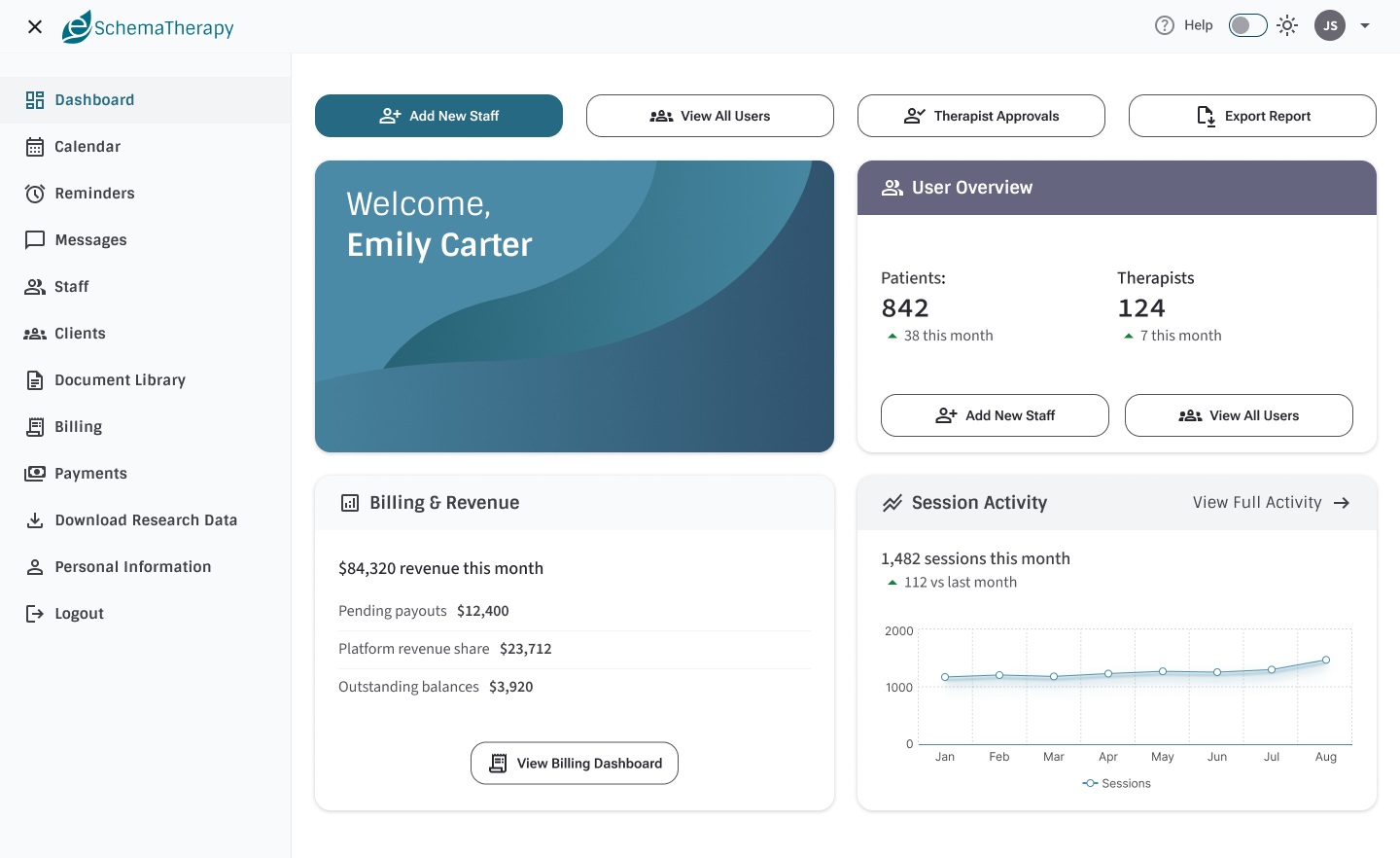
Admin dashboard — approvals, operations, and controlled oversight without unnecessary exposure of clinical detail.
Therapist Dashboard
The therapist dashboard acts as the operational hub of the platform, surfacing upcoming sessions, documentation tasks, alerts, billing issues, and assessments in a single prioritized view.
Alerts are used sparingly and intentionally to highlight items requiring action, such as incomplete forms, failed payments, or sessions needing progress notes.
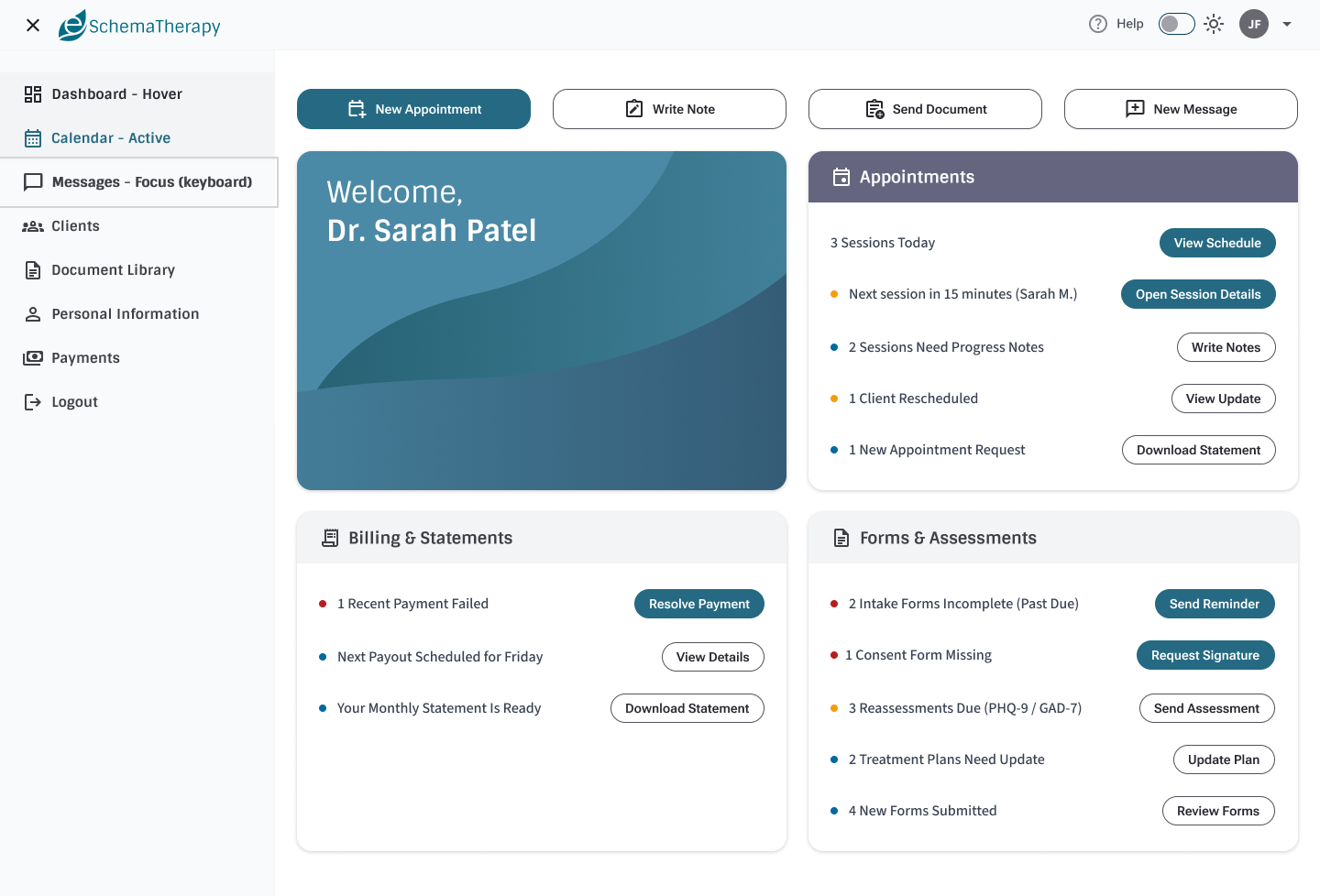
Therapist dashboard — “today’s work” surfaced first, with calm exception-driven alerts and clear CTAs.
Scheduling That Connects to Downstream Work
The calendar supports month, week, and day modes, helping therapists understand availability, upcoming appointments, and completed sessions.
Visual indicators connect scheduling directly to downstream workflows such as documentation and billing, reinforcing continuity across the system.
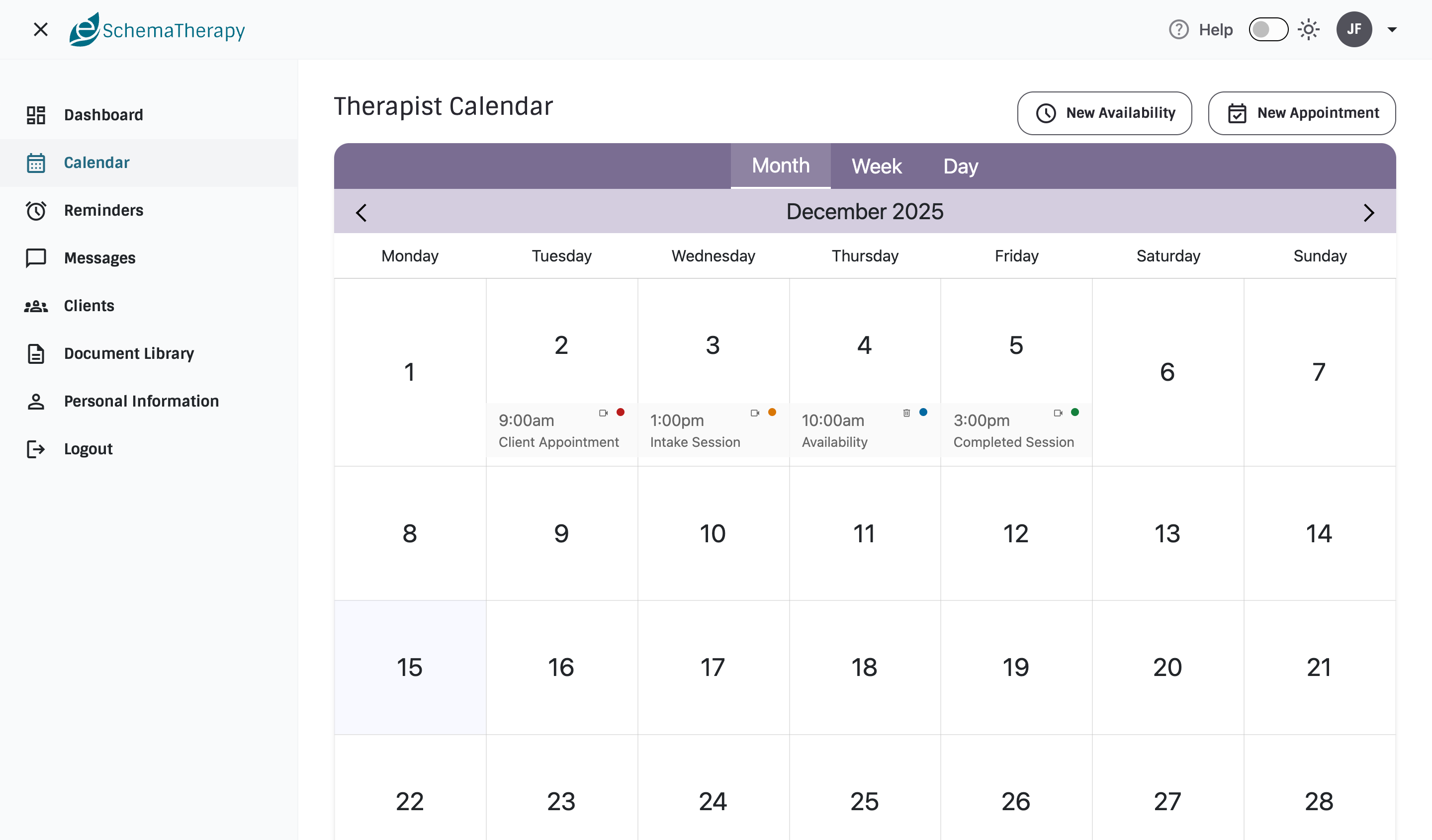
Calendar view — schedules and statuses designed to reduce missed follow-ups and support consistent care.
Patient Dashboard
The patient dashboard is intentionally simplified, focusing on upcoming sessions, required forms, billing actions, and therapist communication.
Information is framed as clear next steps rather than system data, helping patients stay engaged without feeling overwhelmed.
Patient dashboard — action-oriented language and low-noise UI that supports follow-through.
Document Management & Clinical Status
Document management supports clinical workflows such as intake forms, treatment plans, and assessments.
Status indicators (e.g., awaiting signature, in progress, completed) help therapists quickly identify blockers and follow up with confidence.
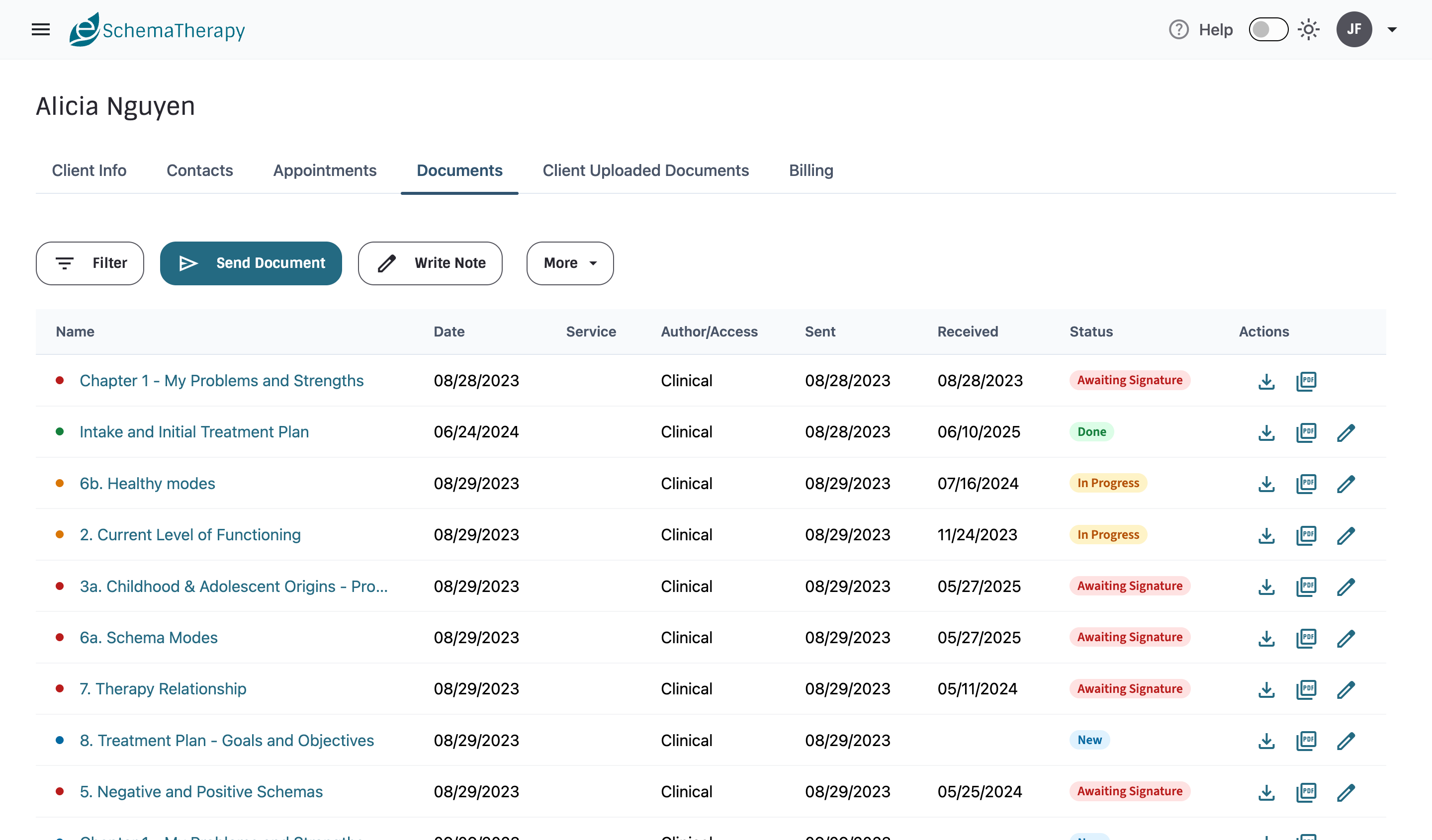
Document statuses — designed to reduce ambiguity and streamline follow-ups.
Billing & Financial Transparency
Billing views are designed to be calm, transactional, and transparent. Rather than overwhelming users with alerts, billing surfaces issues only when exceptions occur — such as failed payments or pending refunds.
This approach maintains trust while ensuring financial issues are visible when action is required.
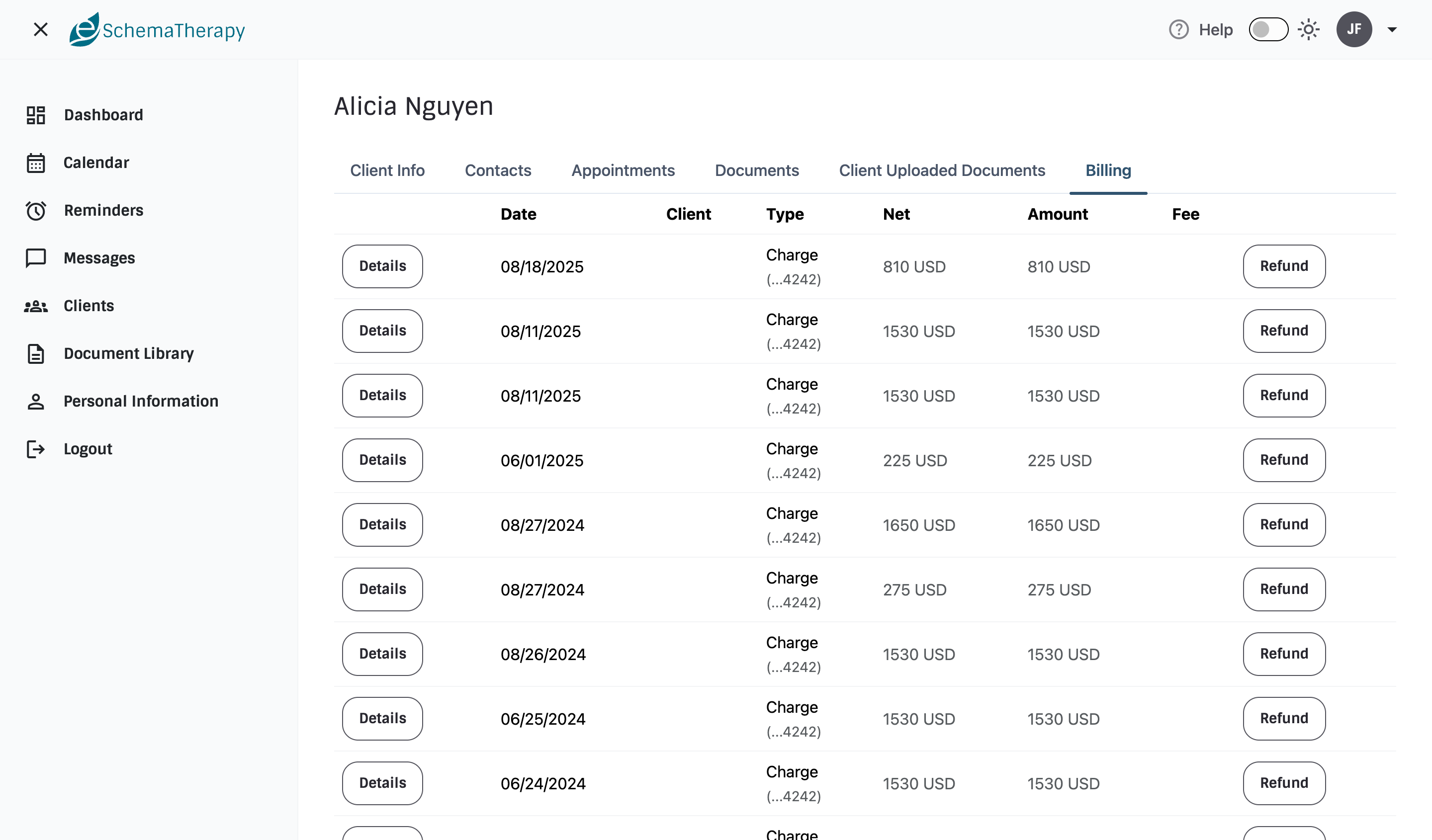
Billing detail — exception-driven visibility to reduce anxiety and improve resolution speed.
Design Principles
- Role-aware complexity: show only what each user needs, when they need it.
- Alert restraint: alerts signal required action, not passive information.
- Continuity of care: scheduling, documentation, and billing are visually and conceptually connected.
- Compliance-by-default: least-privilege access patterns and controlled exports.
- Scalability: token-driven components designed to support future expansion.
Future Enhancements
Planned next steps include expanded reporting for administrators, mobile-optimized patient flows, deeper billing analytics, and richer schema-specific tooling (standardized assessment reporting, structured treatment planning, and longitudinal outcomes tracking). The current foundations establish a scalable platform for iterative growth without compromising usability, clarity, or trust.